Mini POS
Overview
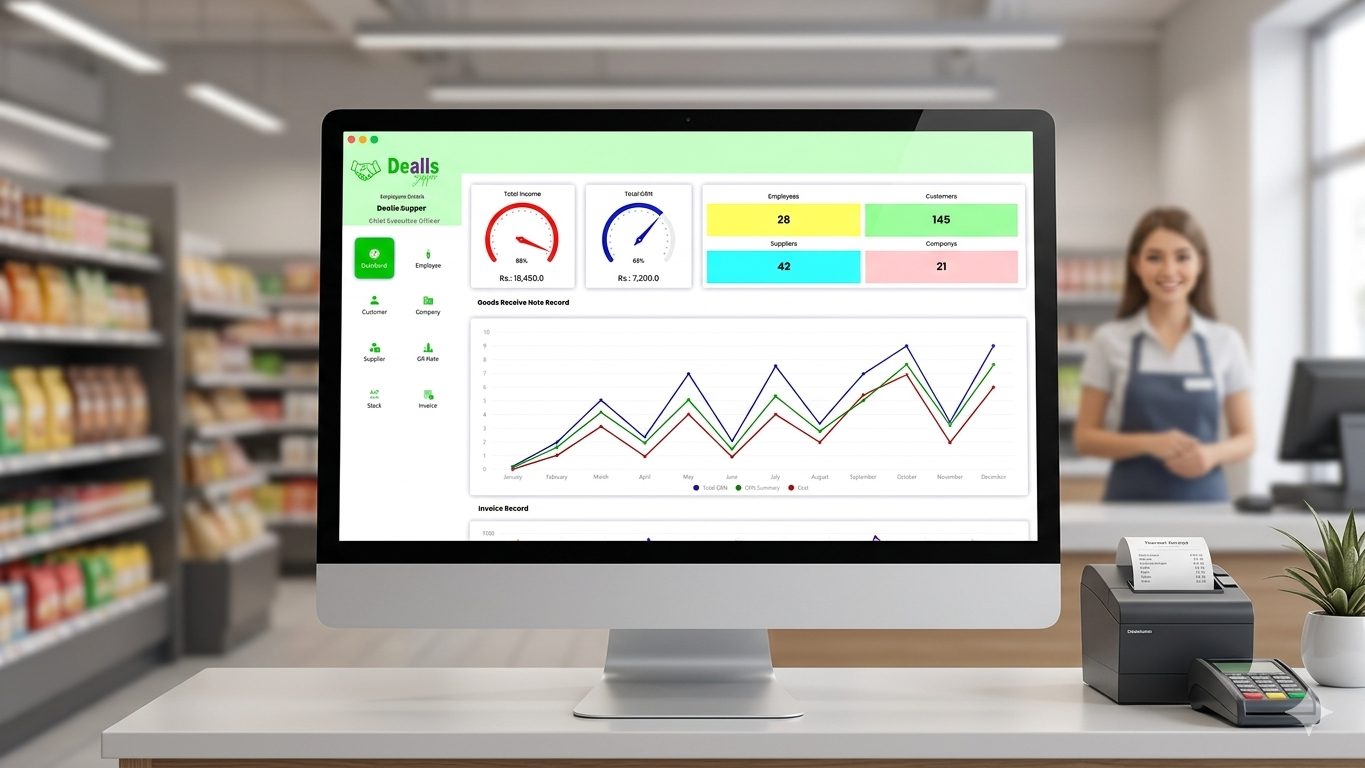
This project showcases a robust and visually engaging Point of Sale (POS) system developed using the Java programming language for the application logic and MySQL for relational database management. It’s designed to provide retail businesses with an all-in-one solution for tracking sales, managing inventory, and generating detailed reports to drive business growth. System Features & Dashboard Overview The dashboard provides an intuitive interface that gives store managers a real-time snapshot of their business operations. Key sections include: 1. Quick Statistics (KPI Cards) These color-coded cards offer an immediate overview of critical metrics: Total Income: Tracks revenue generated over a specific period. Total Debt: Monitor outstanding customer payments. Total Employees & Customers: At-a-glance count of active staff and customer database. Suppliers & Inventory: Track the number of product suppliers and current stock levels. 2. Performance Gauges Two dynamic dial gauges (speedometers) visually represent performance against targets: The first gauge (e.g., Target vs. Actual Sales) provides a visual cue on sales performance. The second gauge tracks progress on another key metric, like inventory turnover or daily sales goals. 3. Goods Receive Note (GRN) Record (Line Chart) A detailed line graph plots the data points for 'Total GRN', 'GRN Inventory', and 'Cost' over the months of the year. This allows for: Trend Analysis: Identify peak purchasing months. Inventory Tracking: Compare the value of goods received against their cost. 4. Side Navigation Bar A clean, icon-based navigation panel on the left allows users to quickly access different modules, such as Dashboard, Employee, Customer, Company, Supplier, Stock, and Invoice, ensuring a streamlined workflow.
The Challenge
Building a complete POS system using only Java and MySQL presents several technical and design challenges. Here are the main obstacles faced during the development: Creating a Modern User Interface (UI) with Java: Java's standard GUI libraries (like Swing or AWT) are powerful but often result in applications with a dated, "classic" look. Designing an intuitive, aesthetically pleasing, and flat "web-like" dashboard was a significant hurdle. Displaying Dynamic Graphs and Gauges: The dashboard requires real-time visualization of data using gauges (speedometers) and complex line charts. Generating these graphics dynamically based on data from the MySQL database is difficult to implement in pure Java without extra effort. Ensuring Data Integrity and Transaction Consistency: A POS system handles critical financial and inventory data. For example, when a sale is finalized, several actions must happen simultaneously: an invoice record is created, the customer's debt is updated, and the stock is reduced. Ensuring that all these operations either succeed together or fail without corrupting the data is a major challenge. Managing Database Connections and Performance: Opening a new connection to the MySQL database for every transaction (like a sales record or stock check) is slow and resource-heavy. This can lead to a sluggish system, especially as the number of transactions and users increases.
Our Solution
Custom Styling and Component Use: To achieve a modern look, we didn't rely on default Java L&Fs (Look and Feels). Instead, we heavily customized Swing components. We used custom painting (e.g., using Graphics2D to create rounded corners, gradients, and subtle shadows) to make panels and buttons look modern. We implemented a card-based layout and modern iconography for a clean, intuitive navigation bar, mimicking modern web dashboard designs. Using External Data Visualization Libraries: Instead of writing custom graphic code from scratch, we integrated a specialized library like JFreeChart into the Java application. This library handles the complex drawing of the multi-line chart for the GRN record. For the speedometer gauges, we customized the visual settings of the chart library or used specific custom drawing classes to translate data values into visual dial indicators. Implementing Database Transactions: To maintain data consistency, we used SQL Transactions. In our Java JDBC code, we explicitly disabled auto-commit (connection.setAutoCommit(false)). We wrapped critical multi-step operations (like finalizing a sale) in a single block of code. If all queries execute successfully, we commit() the transaction. If any part fails, we call rollback() to ensure the database reverts to its previous state. Implementing Connection Pooling: To solve performance issues and optimize database connections, we implemented Connection Pooling (using a library like HikariCP or Apache DBCP). This technique creates a "pool" of database connections that are kept open. When the Java application needs to query MySQL, it borrows a connection from the pool and returns it when finished, eliminating the time-consuming process of opening and closing connections repeatedly. This makes the system significantly faster and more responsive.